Not content with systemd clambering all over my Ubuntu box, I went on a rather lengthy voyage of discovery trying to find out why each and every single ftp transaction was cluttering up my syslog, despite having the usual two logs in my /var/log/proftpd path.
Every time my webcam uploaded a single JPEG photo/snapshot, systemd made entries in my syslog, a minimum of 3 lines at a time. If you know me at all, there's nothing I hate more than 'not being able to see the wood for the trees'. All these entries made looking through my syslog a real chore. systemd is the biggest piece of crap. I'm going to be looking at Devuan in the very near future. Anyway, rant over. Here's how to disable the barking-mad systemd entries for ftp transactions in the syslog:
R2D2:/ $ sudo /usr/bin/systemd-analyze set-log-level notice
You will need to add this line to the file /etc/rc.local so that it runs on boot.
Monday, 16 March 2015


Saturday, 31 January 2015
Wednesday, 22 October 2014
Change screenlock timeout from script - Ubuntu 14.04
My screen is set to blank/timeout after 3 minutes but I find it a real pain to have to go to the menus and then select the 'Brightness & Lock' applet in order to just change the timeout.
Since I love using the shell so much, I thought that I'd investigate seeing if I could achieve the same result via scripting. After a bit of confusion as to which command I should be using (gconf/dconf/gsettings), I discovered the correct way of poking the new values is by using dconf:
dconf write /org/gnome/desktop/session/idle-delay 'uint32 180'
Sets the delay for 3 minutes.
dconf write /org/gnome/desktop/session/idle-delay 'uint32 600'
Sets the delay for 10 minutes.
dconf write /org/gnome/desktop/session/idle-delay 'uint32 3600'
Sets the delay for 1 hour.
Note - you don't need to sudo these commands.
Respect to Jani for pointing me in the right direction.
Since I love using the shell so much, I thought that I'd investigate seeing if I could achieve the same result via scripting. After a bit of confusion as to which command I should be using (gconf/dconf/gsettings), I discovered the correct way of poking the new values is by using dconf:
dconf write /org/gnome/desktop/session/idle-delay 'uint32 180'
Sets the delay for 3 minutes.
dconf write /org/gnome/desktop/session/idle-delay 'uint32 600'
Sets the delay for 10 minutes.
dconf write /org/gnome/desktop/session/idle-delay 'uint32 3600'
Sets the delay for 1 hour.
Note - you don't need to sudo these commands.
Respect to Jani for pointing me in the right direction.
Friday, 29 August 2014
Black box in notification area on Ubuntu 14.04
I've had this annoying problem for a while now, where a black rectangular box appears on my Ubuntu desktop, running Cairo Dock. Most of the links I found on Google didn't pinpoint anything useful so I sat down one day and killed off processes manually, one by one, in an effort to locate the source of my problem.
It would appear that the culprit is update-manager. The process was listed as running with an option/switch of --no-focus-on-map. The full process is shown below:
john 14771 1 0 Aug04 ? 00:00:11 /usr/bin/python3 /usr/bin/update-manager --no-update --no-focus-on-map
lsof -p 14771 shows that /usr/bin/python3.4 is involved, but not sure if that information is of any use.

You can't move the box or do anything with it. The most annoying thing is that it is 'Always on top' so you cannot see anything behind it.
Simply issue the following command at the shell:
killall update-manager
It would appear that the culprit is update-manager. The process was listed as running with an option/switch of --no-focus-on-map. The full process is shown below:
john 14771 1 0 Aug04 ? 00:00:11 /usr/bin/python3 /usr/bin/update-manager --no-update --no-focus-on-map
lsof -p 14771 shows that /usr/bin/python3.4 is involved, but not sure if that information is of any use.
You can't move the box or do anything with it. The most annoying thing is that it is 'Always on top' so you cannot see anything behind it.
Simply issue the following command at the shell:
killall update-manager
Tuesday, 29 October 2013
Slowdown on Ubuntu 13.10, CPU for accounts-daemon
My HP Microserver recently started to run like Herbert's dog on Family Guy, for no apparent reason. It seemed to slow things down when logging in to the desktop GUI. Boot was fine, as I run via an 80Gb SSD but logging in was soooo slow.
Whilst the GUI was taking about 1 minute or so, I switched to a console session (Ctrl-Alt-F1) and saw that there seemed to be 2 processes caning the CPU. The first culprit seemed to be /usr/lib/accountsservice/accounts-daemon whilst the second process was gnome-settings-daemon.
My first kludge was to simply write a script to kill the processes after logging in but that was only a temporary solution. I was still faced with the delay attempting to log in.
Further digging around on the internet showed that it was more than likely due to updates installed recently with regard to the following 3 bits of software:
glib-networking
glib-networking-common
glib-networking-services
Some posters on the thread at http://ubuntuforums.org/showthread.php?t=1970326&page=4 suggested that it only affected 64 bit versions of Ubuntu and that you were able to install an older package version.
I elected to follow the advice given by poster adamiak where he suggested using the following command:
sudo apt-get build-dep accountsservice
(I performed this because I'd previously experienced dependency problems when trying to build the alternative accountsservice listed below - I was missing libpolkit-gobject-1)
I then followed the advice offered by a previous poster ambrosa about building/compiling a version of accountsservice from scratch:
download http://www.freedesktop.org/software/...-0.6.20.tar.xz and extract with
tar xvf accountsservice-0.6.20.tar.xz
cd accountsservice-0.6.20
./configure
make
Replaced the original daemon with newly compiled version (making a backup first)
sudo cp -a /usr/lib/accountsservice/accounts-daemon /usr/lib/accountsservice/accounts-daemon.bak
sudo killall accounts-daemon
sudo cp src/accounts-daemon /usr/lib/accountsservice/accounts-daemon
This solved the problem after a reboot and all is now working perfectly. It took me a while to figure out what was going on so I'm sharing my experience as it may help others :-)
N.B. You will probably have noticed a whole heap of new users listed on the login screen - I am now going to search to find out how to remove those errant users I have no need for.
Cheers.
Whilst the GUI was taking about 1 minute or so, I switched to a console session (Ctrl-Alt-F1) and saw that there seemed to be 2 processes caning the CPU. The first culprit seemed to be /usr/lib/accountsservice/accounts-daemon whilst the second process was gnome-settings-daemon.
My first kludge was to simply write a script to kill the processes after logging in but that was only a temporary solution. I was still faced with the delay attempting to log in.
Further digging around on the internet showed that it was more than likely due to updates installed recently with regard to the following 3 bits of software:
glib-networking
glib-networking-common
glib-networking-services
Some posters on the thread at http://ubuntuforums.org/showthread.php?t=1970326&page=4 suggested that it only affected 64 bit versions of Ubuntu and that you were able to install an older package version.
I elected to follow the advice given by poster adamiak where he suggested using the following command:
sudo apt-get build-dep accountsservice
(I performed this because I'd previously experienced dependency problems when trying to build the alternative accountsservice listed below - I was missing libpolkit-gobject-1)
I then followed the advice offered by a previous poster ambrosa about building/compiling a version of accountsservice from scratch:
download http://www.freedesktop.org/software/...-0.6.20.tar.xz and extract with
tar xvf accountsservice-0.6.20.tar.xz
cd accountsservice-0.6.20
./configure
make
Replaced the original daemon with newly compiled version (making a backup first)
sudo cp -a /usr/lib/accountsservice/accounts-daemon /usr/lib/accountsservice/accounts-daemon.bak
sudo killall accounts-daemon
sudo cp src/accounts-daemon /usr/lib/accountsservice/accounts-daemon
This solved the problem after a reboot and all is now working perfectly. It took me a while to figure out what was going on so I'm sharing my experience as it may help others :-)
N.B. You will probably have noticed a whole heap of new users listed on the login screen - I am now going to search to find out how to remove those errant users I have no need for.
Cheers.
Tuesday, 3 September 2013
Uruguayan architect Rafael Viñoly making a name for himself
Uruguayan architect Rafael Viñoly
He appears to be making a name for himself recently in London. There's a new building, affectionately dubbed the 'walkie-talkie' which has made the news recently. Sunlight appears to be reflected from the building at 20 Fenchurch Street directly into one of the local roads. So intense is the effect that a car has 'melted', a doormat has caught fire and the saddle of a parked bicycle started smoking...
It looks like he's got previous on this - look at the Vdara Hotel in Las Vegas. Designed by the same architect, this one exhibits a similar problem which has been described as the 'Vdara death ray'.
My advice - don't look up to admire the building, which surely negates the desired effect of having designed an attractive building in the first place?
He appears to be making a name for himself recently in London. There's a new building, affectionately dubbed the 'walkie-talkie' which has made the news recently. Sunlight appears to be reflected from the building at 20 Fenchurch Street directly into one of the local roads. So intense is the effect that a car has 'melted', a doormat has caught fire and the saddle of a parked bicycle started smoking...
It looks like he's got previous on this - look at the Vdara Hotel in Las Vegas. Designed by the same architect, this one exhibits a similar problem which has been described as the 'Vdara death ray'.
My advice - don't look up to admire the building, which surely negates the desired effect of having designed an attractive building in the first place?
Thursday, 13 December 2012
New toy for the car, full HD camera and GPS system
BlackVue 16GB DR400G HD II
Full HD video 1920 x 1080 @30fps
GPS Version
I've just purchased this item and installed it in my vehicle. I recently suffered some vandal damage (3 tyres were punctured) and I wanted to catch the cretins in action.
I've already witnessed some poor lost soul navigating a roundabout the WRONG way and also seen a mugging. It's come in very useful so far and a friend who saw the video quality bought one immediately - he was that impressed.
Have a nose at my YouTube channel - search for montevideobadboy
Full HD video 1920 x 1080 @30fps
GPS Version
I've just purchased this item and installed it in my vehicle. I recently suffered some vandal damage (3 tyres were punctured) and I wanted to catch the cretins in action.
I've already witnessed some poor lost soul navigating a roundabout the WRONG way and also seen a mugging. It's come in very useful so far and a friend who saw the video quality bought one immediately - he was that impressed.
Have a nose at my YouTube channel - search for montevideobadboy
Evolution 2.32.2 email client - exporting to new PC
For those of you that have been reading my blog, you'll know that I recently acquired an HP Microserver N40L. It now has two extra HDDs added, in the shape of a couple of 1.5Tb units from Western Digital.
Now that I have the extra capacity, I set about the onerous task of copying the data across from my main PC's Evolution (version 2.32.2) email data store and onwards to its new destination on the HP micro-server.
I used the 'File | Backup Evolution settings' option on the source client's Evolution app to make a tar.gz backup of all the necessary files - or so I thought.
The import on the new system took ages (4.5GB of data) but eventually completed, almost. It finished but then started off again with the same prompt i.e. Import data etc. At this point, I shut Evolution down on the new server and went back to my old PC.
Having done most of the grunt work, you will still need to export some other data via the gconftool-2 utility:
gconftool-2 --dump /apps/evolution > pc_evolution_data.xml
On new PC, do the following:
gconftool-2 --load pc_evolution_data.xml
I fired up Evolution on the new PC/micro-server and it all worked fine. All I then had to do was enter the passwords for my email accounts.
Now that I have the extra capacity, I set about the onerous task of copying the data across from my main PC's Evolution (version 2.32.2) email data store and onwards to its new destination on the HP micro-server.
I used the 'File | Backup Evolution settings' option on the source client's Evolution app to make a tar.gz backup of all the necessary files - or so I thought.
The import on the new system took ages (4.5GB of data) but eventually completed, almost. It finished but then started off again with the same prompt i.e. Import data etc. At this point, I shut Evolution down on the new server and went back to my old PC.
Having done most of the grunt work, you will still need to export some other data via the gconftool-2 utility:
gconftool-2 --dump /apps/evolution > pc_evolution_data.xml
On new PC, do the following:
gconftool-2 --load pc_evolution_data.xml
I fired up Evolution on the new PC/micro-server and it all worked fine. All I then had to do was enter the passwords for my email accounts.
Tuesday, 14 August 2012
HP Microserver N40L - WOL problem (wake on lan)
UPDATE (April 2014) - a comment from a poster states that he had to change "eth0 to em1" for it to work under Ubuntu 14.04
------------------------
I've recently purchased a beautifully crafted mini server made by HP; it's the HP N40L microserver.
------------------------
I've recently purchased a beautifully crafted mini server made by HP; it's the HP N40L microserver.
Leaving my PC switched on all day consumed anywhere between 110-180 watts of power so I was looking at ways of reducing energy consumption and this box only uses around 60 watts.
Memory has been increased from 2Gb to 8Gb, and the spare 2Gb stick of RAM now sits in my main PC - result!
Windows 7 worked OK until the legendary 'dazloader' patch was installed, and then it wouldn't boot (BSOD). BIOS problems might be the cause of that?
Anyway, the annoying thing about this box and Linux (specifically Ubuntu 10.10) is that the Wake On Lan functionality does not work. I did see a post about this mentioned on another blog here http://confoundedtech.blogspot.co.uk/2011/06/enable-wol-on-ubuntu-hp-microserver.html but the instructions didn't seem too clear to me and needed a tidy-up/re-write.
Here's the 3 lines of code we will be using later:
#!/bin/bash
ifconfig eth0 down
poweroff
ifconfig eth0 down
poweroff
It is more than likely that ethtool is not installed on your system by default, so install it with the following command:
sudo apt-get install ethtool
Once installed, see if your ethernet card supports WOL:
sudo ethtool eth0
This should return the following information:
Settings for eth0:
Supported ports: [ TP ]
Supported link modes: 10baseT/Half 10baseT/Full
100baseT/Half 100baseT/Full
1000baseT/Half 1000baseT/Full
Supports auto-negotiation: Yes
Advertised link modes: 10baseT/Half 10baseT/Full
100baseT/Half 100baseT/Full
1000baseT/Half 1000baseT/Full
Advertised pause frame use: No
Advertised auto-negotiation: Yes
Speed: 100Mb/s
Duplex: Full
Port: Twisted Pair
PHYAD: 1
Transceiver: internal
Auto-negotiation: on
MDI-X: Unknown
Supports Wake-on: g
Wake-on: g
Current message level: 0x000000ff (255)
Link detected: yes
Supported ports: [ TP ]
Supported link modes: 10baseT/Half 10baseT/Full
100baseT/Half 100baseT/Full
1000baseT/Half 1000baseT/Full
Supports auto-negotiation: Yes
Advertised link modes: 10baseT/Half 10baseT/Full
100baseT/Half 100baseT/Full
1000baseT/Half 1000baseT/Full
Advertised pause frame use: No
Advertised auto-negotiation: Yes
Speed: 100Mb/s
Duplex: Full
Port: Twisted Pair
PHYAD: 1
Transceiver: internal
Auto-negotiation: on
MDI-X: Unknown
Supports Wake-on: g
Wake-on: g
Current message level: 0x000000ff (255)
Link detected: yes
As you can see, both the 'Supports Wake-on' and 'Wake-on' fields show 'g' which means it is supported.
We now need to make an entry in the /etc/rc.local file, which may be empty already. Insert the following line of code into the file, using whichever editor your prefer (vi/emacs or gedit for those GUI-lovers out there)
sudo ethtool -s eth0 wol g
Save the file away to disk.
Entries now need to be created for correct shutdown operation. We will be using the 3 lines of code mentioned earlier in this article:
sudo vi /etc/rc6.d/K99wol_poweroff
Paste these 3 lines of code into the file:
#!/bin/bash
ifconfig eth0 down
poweroff
ifconfig eth0 down
poweroff
Save the file to disk.
Mark the file executable:
sudo chmod 755 /etc/rc6.d/K99wol_poweroff
Now copy the file to 2 separate locations:
sudo cp /etc/rc6.d/K99wol_poweroff /etc/rc6.d/K9ls
sudo cp /etc/rc6.d/K99wol_poweroff /etc/rc0.d/K99wol_poweroff
You should now be able to shutdown the server. Please note that mine seemed to hang on shutdown the first time, but a subsequent reboot/shutdown seemed to clear it.
Try pinging the ethernet interface with your favourite/preferred magic ping packet tool. I tend to use the wol client from my Buffalo WHR-G300N router that's running DD-WRT.
Wednesday, 23 May 2012
Call of Duty - Modern Warfare PS3 update!
I've recently found out a way of getting past the loop mentioned in my previous post, where users of the original Modern Warfare were unable to get past the Yes/No option when attempting to play the game.
After watching a few videos on YouTube, the trick involves switching off your WiFi router so that the PS3 starts the game without a network connection - if you're using wireless that is.
The game should now start without that annoying error message that you simply cannot dismiss or answer. As soon as you get to the point where you can access the multiplayer menu option, simply switch your Wifi router on, wait a minute and then play.
Acitivision's website is completely useless in this regard since all it offers as advice is to reconnect your PS3 up to the router - which simply doesn't work and I've verified that by trying it.
Saturday, 17 December 2011
Modern Warfare - error after v1.40 update
Fired up my copy of Modern Warfare the other day as I'd started to get bored with all the nonsense of MW3/MW2 and I fancied getting my gold shotgun out again.
Anyway, had to download the latest update to v1.40 and once the update had completed, I was met with the following screen where it asked me a question without actually stating exactly WHAT the question was:

I could move between Yes and No but pressing the X button on the PS3 controller had no effect whatsoever. I made contact with Activision who admitted there was a problem and they were working on it.
Anyway, had to download the latest update to v1.40 and once the update had completed, I was met with the following screen where it asked me a question without actually stating exactly WHAT the question was:

I could move between Yes and No but pressing the X button on the PS3 controller had no effect whatsoever. I made contact with Activision who admitted there was a problem and they were working on it.
Thursday, 3 November 2011
AVAST - my preferred choice of anti-virus program
Download the latest and greatest version of Avast here:
LINK
It's quite a bit faster than AVG and less of a memory hog. Sorry AVG, but you've had your day.
LINK
It's quite a bit faster than AVG and less of a memory hog. Sorry AVG, but you've had your day.
Wednesday, 20 July 2011
Regback process on Windows Vista - slow
Open a cmd prompt box (right-click and Run as Administrator)
Navigate to the following folder:
C:\Windows\System32\config\regback
Delete any files names regxxxx - where xxxx is some arbitrary number.
Navigate to the following folder:
C:\Windows\System32\config\regback
Delete any files names regxxxx - where xxxx is some arbitrary number.
Friday, 15 July 2011
Wireless ADSL routers - suggestions
Here's a nice Buffalo unit on Ebuyer
http://www.ebuyer.com/product/243075
or Cisco/Linksys
http://www.ebuyer.com/product/191547
http://www.ebuyer.com/product/243075
or Cisco/Linksys
http://www.ebuyer.com/product/191547
Friday, 10 June 2011
PlayStation Network - Welcome back offer
After the recent PSN hack fiasco, Sony have finally offered us gamers the option to download your choice of 2 free games from a selection.
This goes some way to recompense me for the fact that Sony have locked my account, saying that there were 5 PS3s connected to that account. When my old '60Gb fat launch version' borked for the last time, I took the option of purchasing a new 'slim' PS3. After connecting it up, and attempted to download all of my previously purchased content (DLC stuff like map packs for Call of Duty), I was met with an error message saying "5 PS3s connected to this account, unable to download". What a complete load of spherical objects. This is on a brand new PS3.
Anyway, on to the new free games situation. I simply hooked up my PS3 to all 5 of my PSN accounts, downloaded 2 games on one UID, then logged in to one of the other accounts, and hey presto, more free games.
On this occasion, Sony 0 - Johnnyboy 1 :-)
This goes some way to recompense me for the fact that Sony have locked my account, saying that there were 5 PS3s connected to that account. When my old '60Gb fat launch version' borked for the last time, I took the option of purchasing a new 'slim' PS3. After connecting it up, and attempted to download all of my previously purchased content (DLC stuff like map packs for Call of Duty), I was met with an error message saying "5 PS3s connected to this account, unable to download". What a complete load of spherical objects. This is on a brand new PS3.
Anyway, on to the new free games situation. I simply hooked up my PS3 to all 5 of my PSN accounts, downloaded 2 games on one UID, then logged in to one of the other accounts, and hey presto, more free games.
On this occasion, Sony 0 - Johnnyboy 1 :-)
Wednesday, 1 June 2011
Windows XP error
Just reinstalled XP after a new PC purchase and came across a problem:
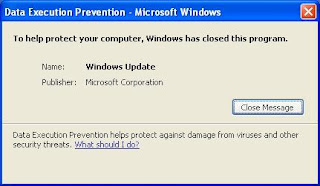
Oh, how I laughed at the irony of Microsoft's DEP pulling the plug on Windows Update.
Clowns.

Oh, how I laughed at the irony of Microsoft's DEP pulling the plug on Windows Update.
Clowns.
Monday, 9 May 2011
Playstation Network outage (PSN)
The PSN went down on the 21st April, it is now the 9th May. I make that over 3 weeks ago...
What the blue blazes are you doing, Sony? Where's your commitment to all the loyal people like me who have invested literally thousands in your company's products?
In this day and age of SLAs and KPIs, Sony seem not to care about them one iota.
Get it fixed, soon.
What the blue blazes are you doing, Sony? Where's your commitment to all the loyal people like me who have invested literally thousands in your company's products?
In this day and age of SLAs and KPIs, Sony seem not to care about them one iota.
Get it fixed, soon.
Sunday, 17 April 2011
Back in the day...
Born in the 60s or 70s? Read on...
According to today's regulators and bureaucrats, those of us who were babies in the 1960s, 1970s and early 1980s probably shouldn't have survived, because our baby cots were covered with brightly coloured lead-based paint which was regularly chewed and licked. We had no childproof lids on medicine bottles or baby monitors or latches on cabinets, and it was fine to play with pans and cardboard boxes.
When we rode our bikes, we wore no helmets, just flip-flops and fluorescent 'spokey dokeys' on our wheels. If we rode in cars we had no seatbelts in the back, and riding in the boot was a real treat. We drank water from garden hoses and public fountains and it tasted just the same. We scrumped apples and ate blackberries without washing them first. Of course we ate chips and wham bars and drank full-fat milk, but were never overweight because we were always playing out. We shared one Lilt or Panda Shandy between four friends - from the same bottle or can - and no one died from it. We would spend several hours re-building go-carts, then go top speed down the hill, only to find out we'd forgotten the brakes. After running into a patch of stinging nettles a few times, we learned to solve the problem. We would leave home in the morning and play all day, as long as we were back before it got dark. No one was able to reach us and no one minded.
We looked out for the other kids on our street we knew who lived in each house, and not everybody was a paedophile. We didn't have televisions in our bedrooms and there were only three or four channels. Sometimes, the television just got switched off!! When it rained we played cards, or built things from Lego, Meccano, papier maché, egg cartons and pasta shells. Sometimes we listened to the radio. There was no surround sound, no mobile phones, no personal computers, no DVDs, no Internet chat-rooms, or MSN. We had friends - we went outside and found them. We played penny-up-the-wall, football, manhunt and skipping. In the summer we had water-fights with kids we hardly knew and organised big games of football and rounders. Sometimes that ball really hurt. We fell off skateboards and out of trees. We double-dared each other and sometimes it didn't work out. We grazed knees and broke bones, but there were no law suits. We wore our scars with pride. We played Knock Down Ginger
and were actually afraid of the owners catching up with us. We were scared of the old lady who lived on the corner - not the other way round. The corner shop let the four of us in at the same time, and those pretend cigarettes are definitely not the reason some of us smoke as adults. We walked to friends' homes. If they lived quite far away, we borrowed our next-door-neighbour's bike. We also, believe it or not, walked to school; we didn't rely on Mummy to drive us to school as it was just round the corner. We made up games with sticks and punctured beachballs. We rode bikes in packs of seven and wore our coats by only the hood. The idea of a parent bailing us out if we had a run-in with the law was unheard of; their punishments were usually worse...
That generation produced some of the best risk-takers, problem-solvers and inventors, ever. The past 50 years have seen an explosion of innovation and new ideas. We had freedom, failure, success and responsibility, and we learned how to deal with it all. Not every one of us passed our exams at school, not everybody did well at everything, and not everyone had a gap-year. But it all turned out okay, and everybody learnt to cope with the hard bits. And you're one of them. Congratulations!
According to today's regulators and bureaucrats, those of us who were babies in the 1960s, 1970s and early 1980s probably shouldn't have survived, because our baby cots were covered with brightly coloured lead-based paint which was regularly chewed and licked. We had no childproof lids on medicine bottles or baby monitors or latches on cabinets, and it was fine to play with pans and cardboard boxes.
When we rode our bikes, we wore no helmets, just flip-flops and fluorescent 'spokey dokeys' on our wheels. If we rode in cars we had no seatbelts in the back, and riding in the boot was a real treat. We drank water from garden hoses and public fountains and it tasted just the same. We scrumped apples and ate blackberries without washing them first. Of course we ate chips and wham bars and drank full-fat milk, but were never overweight because we were always playing out. We shared one Lilt or Panda Shandy between four friends - from the same bottle or can - and no one died from it. We would spend several hours re-building go-carts, then go top speed down the hill, only to find out we'd forgotten the brakes. After running into a patch of stinging nettles a few times, we learned to solve the problem. We would leave home in the morning and play all day, as long as we were back before it got dark. No one was able to reach us and no one minded.
We looked out for the other kids on our street we knew who lived in each house, and not everybody was a paedophile. We didn't have televisions in our bedrooms and there were only three or four channels. Sometimes, the television just got switched off!! When it rained we played cards, or built things from Lego, Meccano, papier maché, egg cartons and pasta shells. Sometimes we listened to the radio. There was no surround sound, no mobile phones, no personal computers, no DVDs, no Internet chat-rooms, or MSN. We had friends - we went outside and found them. We played penny-up-the-wall, football, manhunt and skipping. In the summer we had water-fights with kids we hardly knew and organised big games of football and rounders. Sometimes that ball really hurt. We fell off skateboards and out of trees. We double-dared each other and sometimes it didn't work out. We grazed knees and broke bones, but there were no law suits. We wore our scars with pride. We played Knock Down Ginger
and were actually afraid of the owners catching up with us. We were scared of the old lady who lived on the corner - not the other way round. The corner shop let the four of us in at the same time, and those pretend cigarettes are definitely not the reason some of us smoke as adults. We walked to friends' homes. If they lived quite far away, we borrowed our next-door-neighbour's bike. We also, believe it or not, walked to school; we didn't rely on Mummy to drive us to school as it was just round the corner. We made up games with sticks and punctured beachballs. We rode bikes in packs of seven and wore our coats by only the hood. The idea of a parent bailing us out if we had a run-in with the law was unheard of; their punishments were usually worse...
That generation produced some of the best risk-takers, problem-solvers and inventors, ever. The past 50 years have seen an explosion of innovation and new ideas. We had freedom, failure, success and responsibility, and we learned how to deal with it all. Not every one of us passed our exams at school, not everybody did well at everything, and not everyone had a gap-year. But it all turned out okay, and everybody learnt to cope with the hard bits. And you're one of them. Congratulations!
Sunday, 9 January 2011
PS3 - YLOD and now fixed!
I had a bit of bad luck recently, what with my car accident and then my beloved PS3 died on me. Great, rang Sony and they refused to replace it. They offered me a 'refurb' unit at £130 and only 3 months warranty. See you later Sony.
Youtube revealed a series of YLOD fixes and most of them were based on the old trick 'turn power on whilst pressing the EJECT button on the BluRay drive'. No help to me with my launch 60Gb PS3.
One of the videos by a northern bloke called 'gilksy' pointed me in the direction of a possible fix. I took my PS3 round my mates house and performed the fix, which basically involved reflowing the solder on the board. It took us a couple of hours in total, and we did 20 seconds of 300C heat.
This didn't work.
3 days later, I tried again on my own - and used 40-45 seconds of 300C heat. Put it all back together and it WORKED!!!!
Very pleased with the result. The only difference to gilksy's procedure was that I used a drinks mug to support the BGAs when being heated from the underside.
What a total result! :-)
JB
Youtube revealed a series of YLOD fixes and most of them were based on the old trick 'turn power on whilst pressing the EJECT button on the BluRay drive'. No help to me with my launch 60Gb PS3.
One of the videos by a northern bloke called 'gilksy' pointed me in the direction of a possible fix. I took my PS3 round my mates house and performed the fix, which basically involved reflowing the solder on the board. It took us a couple of hours in total, and we did 20 seconds of 300C heat.
This didn't work.
3 days later, I tried again on my own - and used 40-45 seconds of 300C heat. Put it all back together and it WORKED!!!!
Very pleased with the result. The only difference to gilksy's procedure was that I used a drinks mug to support the BGAs when being heated from the underside.
What a total result! :-)
JB
Thursday, 28 October 2010
Internet radio stations
Bearing in mind the time I spent in Uruguay in 2008-2009, I developed a love for all things internet radio-based.
Some of the stations I listen to on a regular basis include Deep FM, Audiogrooves.net and PointBlankFM.
I've also been able to add a gadget to the right hand side of my blog as you can see...
Cheers,
JG
Some of the stations I listen to on a regular basis include Deep FM, Audiogrooves.net and PointBlankFM.
I've also been able to add a gadget to the right hand side of my blog as you can see...
Cheers,
JG
Subscribe to:
Posts (Atom)